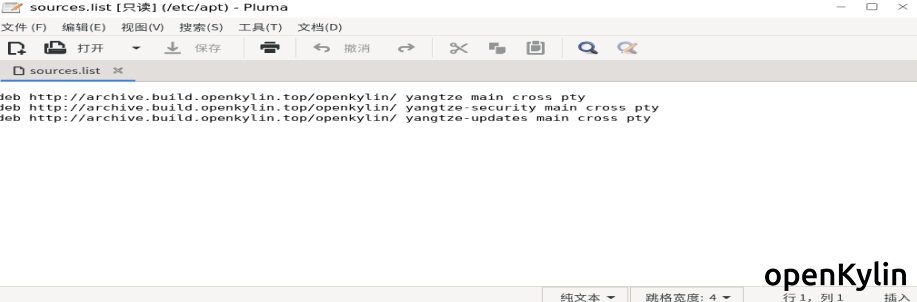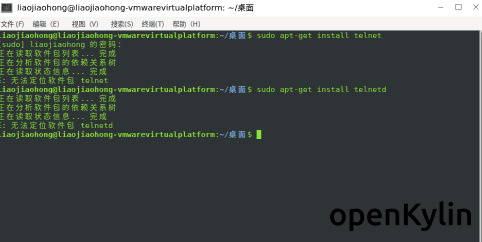
安装telnet遇到无法定位软件包的问题,求解决办法谁能给个最新的source.list中的源,我现在的是这样的
[list=1]
[]sudo apt-get install telnet
[]sudo apt-get install telnetd
[]sudo apt-get install openbsd-inetd
[]sudo apt-get install xinetd
[]sudo /etc/init.d/xinetd restart 或 sudo systemctl restart xinetd
[]netstat -a | grep telnet
[*]telnet localhos
[/list]
sudo vi /etc/apt/sources.list
#临时添加Debian11源
deb http://mirrors.tuna.tsinghua.edu.cn/debian/ bullseye main contrib non-free
deb http://mirrors.tuna.tsinghua.edu.cn/debian/ bullseye-updates main contrib non-free
deb http://mirrors.tuna.tsinghua.edu.cn/debian/ bullseye-backports main contrib non-free
deb http://mirrors.tuna.tsinghua.edu.cn/debian-security bullseye-security main contrib non-free
sudo apt update
#可能需要安装相应的公钥
sudo apt-key adv --keyserver keyserver.ubuntu.com --recv-keys 缺少的公钥
例如:
sudo apt-key adv --keyserver keyserver.ubuntu.com --recv-keys 6A030B21BA07F4FB
sudo apt install telnet
安装好后,注释掉Debian11源,更新源。
sudo vi /etc/apt/sources.list /et
#临时添加Debian11源
#deb http://mirrors.tuna.tsinghua.edu.cn/debian/ bullseye main contrib non-free
#deb http://mirrors.tuna.tsinghua.edu.cn/debian/ bullseye-updates main contrib non-free
#deb http://mirrors.tuna.tsinghua.edu.cn/debian/ bullseye-backports main contrib non-free
#deb http://mirrors.tuna.tsinghua.edu.cn/debian-security bullseye-security main contrib non-free
sudo apt update
注意:请安装好telnet后一定注释掉Debian11源,否则很可能会造成系统损坏!!!